


If you are using Perpetual (at invoicing) as your Inventory Valuation Method it works exactly the same way.
- the account you set on the Inventory Adjustment location is now called Inventory Variation
- Odoo will generate a Journal Entry debiting Inventory Valuation and crediting Clearing
If you are using Periodic (at closing) as your Inventory Valuation Method, the value of your Inventory uploaded will show on the new Inventory Valuation report in the Review Menu in Accounting:
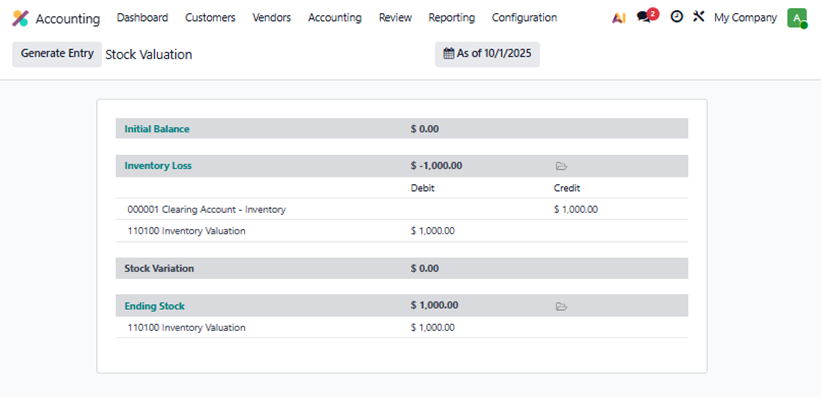
Click the Generate Entry button to have the Journal Entry created for you, the same one Odoo creates under the first method:
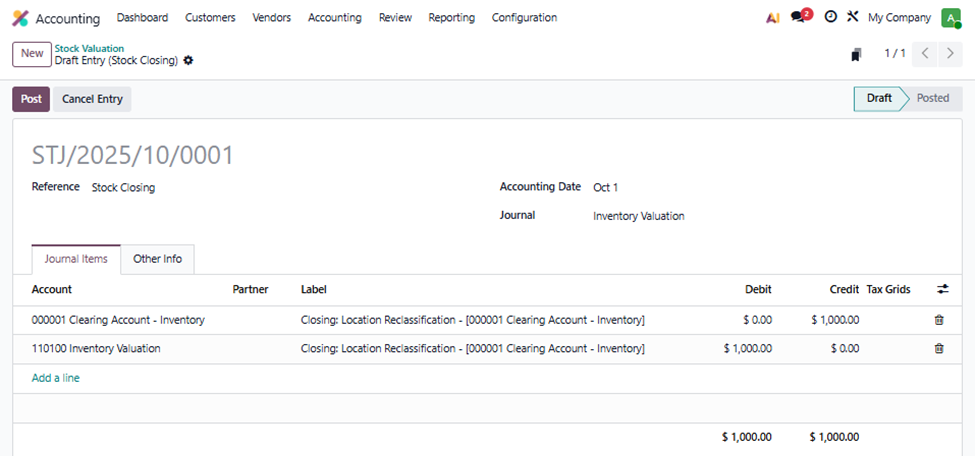
Note: here we created an Inventory Adjustment for a single Product with a Unit Price of $10 and a Quantity of 100.