


If you plan on having a particular product's stock tracked, you should have created this product accordingly (Product Type: 'Good' and Track Inventory 'true') because once sold, you can not change its Product Type anymore!
The latest releases of Odo would allow you to set an initial Quantity on Hand right at the time these options are set:
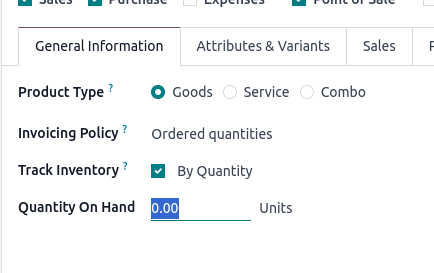
Now, depending on your needs, what you can do is to set the Invoicing Policy (also in above screen) on the product to 'Ordered Quantity'. This way your invoicing process will not be blocked by low stock levels / no stock.
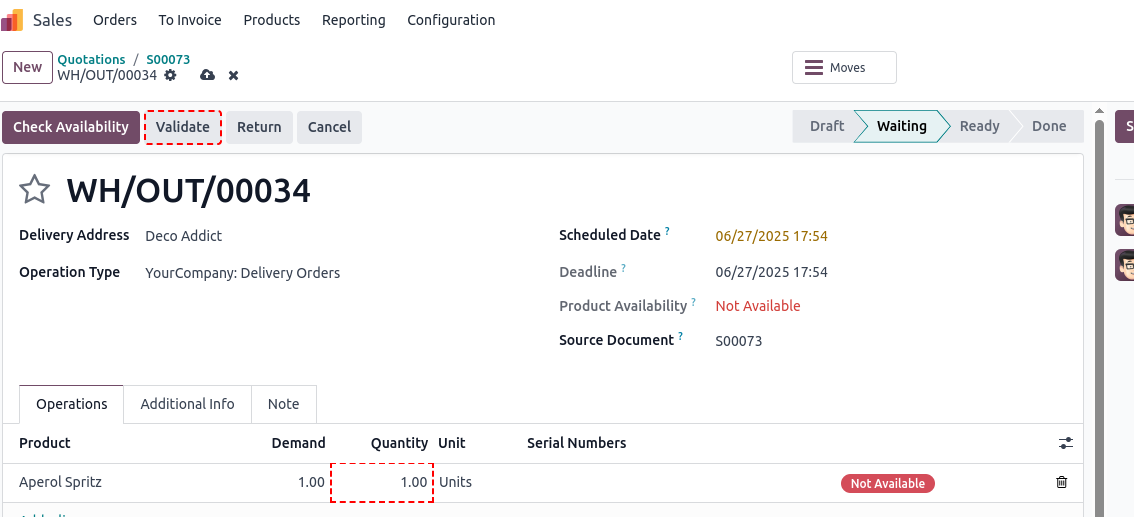
If this isn't an option or you still want to make sure that deliveries happen prior to invoicing your customers, you can also forcefully override the Quantity field in the delivery to match your need and then hit Validate:
You may as well start with a more or less random count on your stock items (Inventory -> Operations -> Adjustments -> Physical Inventory) by setting the On Handy Quantity here.
In any case, you must be aware about the fact that all reports related to stock levels, this may as well include your inventory valuation, will be pointless until you perform an actual count. Thus, while above approaches are possible, I wouldn't really suggest you do take this shortcut.
Thank you Christoph, I will try those approaches and hopefully get something that works.