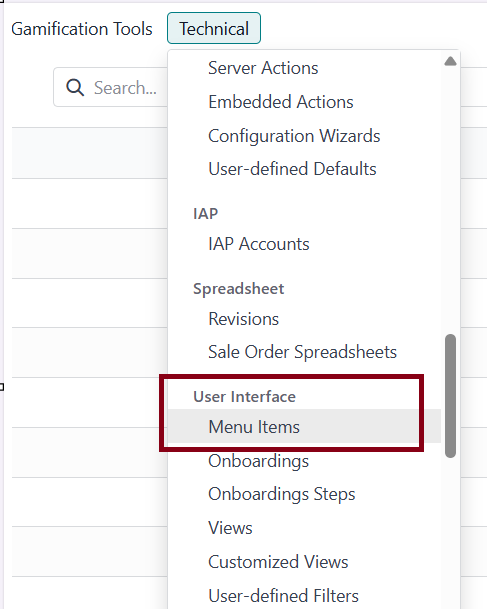
0 Edit Close Delete Flag Supprimer app créée avec studio app Edit Close Delete Flag odoo 6 May 2025 Unsubscribe Subscribe developmentdebug Comment Share 1 Comment Post Comment Discard odoo - 6 May 2025 Delete Convert as a answer Under the user interface => Menu Items (Rubriques en Français), search your app delete it or archive it 2 Answers 0 odoo 6 May 2025 Best Answer Enable developer mode, go to Settings / Technical / User Interface / Menu Items and delete or archive the menu "Synchro Planning" (or remove access for users). Comment Share 1 Comment Post Comment Discard odoo - 6 May 2025 Delete Convert as a answer it's ok, thanks to your explanations. 0 odoo 6 May 2025 Best Answer Thank you for your help. I've already tried this solution but I don't have the “Menu Items” section in my technical menu:(Developer mode active) Comment Share Post Comment Discard



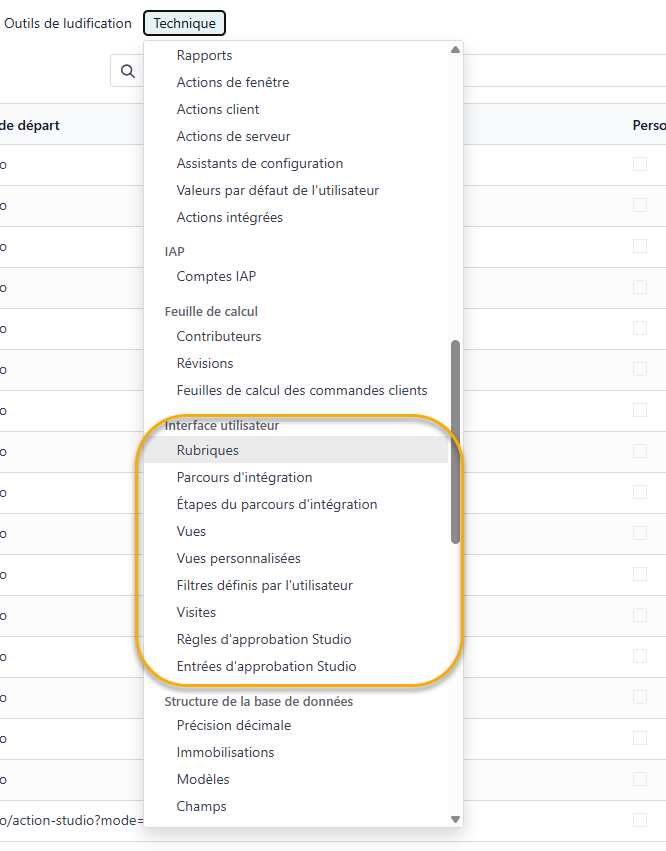
Under the user interface => Menu Items (Rubriques en Français), search your app delete it or archive it